Integrating Alphabet Beads: A Practical Workflow for Designers and Creators
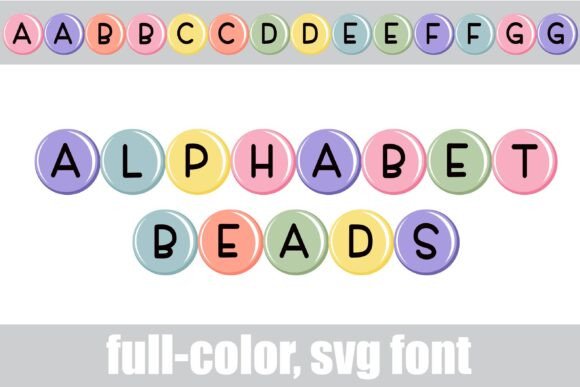
In the landscape of digital design, typography has evolved beyond simple vector outlines into complex, color-rich assets. For professionals, entrepreneurs, and hobbyists looking to inject personality into their projects without sacrificing scalability, Alphabet Beads presents a unique solution. This full-color SVG font features round, pastel-colored beads with a simple print aesthetic, bridging the gap between playful whimsy and professional execution. Understanding how to implement this asset effectively requires a grasp of technical compatibility, font management, and creative workflow integration.
Understanding the Technical Foundation
Before integrating Alphabet Beads into a project pipeline, it is essential to understand the underlying technology. This asset is an OpenType full-color SVG font. Unlike standard fonts that rely on single-color vector outlines, SVG fonts embed Scalable Vector Graphics directly within the font file. This allows for multiple colors, gradients, and intricate details—such as the bead texture and pastel shading—to be rendered in a single glyph.
The installation process follows standard protocols for OpenType (.otf) files, but users must verify their operating system’s handling of color fonts. On macOS, this typically involves using FontBook, while Windows users can install the font via the Control Panel or a preferred third-party font manager. It is important to note a common observation during the installation phase: Alphabet Beads will often appear as solid black in the font preview window, even in compatible programs. This is a standard rendering behavior for color fonts during the selection phase. The true test of compatibility occurs only when the text is typed onto the canvas; if the software supports full-color SVG, the pastel hues will appear immediately.
System and Software Compatibility
Integrating Alphabet Beads into a professional workflow requires aligning the asset with software that supports OpenType-SVG features. As of current industry standards, this includes major creative suites such as Adobe products (Photoshop, Illustrator), Quark, Inkscape, and specific design platforms like Silhouette Studio. For creators working outside these environments, it is prudent to test the font early in the planning stage. If the target software does not support color fonts, the design will render as a solid black silhouette, losing the signature pastel bead effect. This compatibility check is a critical step in the quality control process to prevent workflow bottlenecks later.
Workflow Integration and Character Access
Once installed, Alphabet Beads functions as a standard typing tool, but accessing its full potential requires a specific interaction method. The primary typeface offers a complete set of round, pastel letters. However, the design includes an alternate case of additional colors. Accessing these variations depends on the user's operating system or the specific glyph map provided by design software like Silhouette.
For projects requiring color variety—such as creating a rainbow effect or matching specific brand palettes—the alternate glyph workflow is essential. Designers should plan their color blocking before typing. By toggling between the primary and alternate character sets via the system’s character viewer or the software's glyph map, users can swap colors for specific letters. This method allows for precise control over the visual hierarchy of the text.
Utilizing Special Characters
Efficient use of Alphabet Beads also involves leveraging the included thematic icons. The font includes a bunny and a chick, accessible through specific keyboard inputs. By typing the "greater than" (>) and "less than" (<) glyphs, users can instantly insert these illustrations. This feature is particularly useful for streamlining the design process during seasonal campaigns, children’s educational materials, or spring-themed marketing assets. Instead of sourcing separate vector illustrations and attempting to match their style to the typography, the elements are pre-integrated, ensuring visual consistency.
Practical Application in Design Projects
The utility of Alphabet Beads extends across various project types. Because SVG fonts are vector-based, they can be scaled to any size without pixelation or loss of quality. This scalability makes the font suitable for both small-format items like sticker sheets and large-format applications like posters or signage.
Use Cases for Professionals and Hobbyists
For small business owners and marketers, Alphabet Beads offers a quick way to create eye-catching social media graphics or packaging designs that evoke a tactile, handmade feel. The pastel palette is neutral enough to work across various brand identities but distinct enough to stand out in a crowded feed.
Educators and parents can utilize this font for creating learning aids. The distinct, "bead" style of the letters can help children distinguish individual characters, while the color alternates can be used to highlight vowels or consonants. Because the font is installed like any standard typeface, it integrates seamlessly into word processors for creating worksheets.
Crafters and hobbyists, particularly those using cutting machines, will find the font optimized for their workflow. In software like Silhouette Studio, the ability to access the glyph map allows for rapid customization of monograms or iron-on vinyl designs.
Optimization and Best Practices
To ensure a smooth implementation of Alphabet Beads, consider the following operational guidelines:
- File Management: Keep the .otf file organized in a dedicated font library. If using a font manager, tag it appropriately (e.g., "Display," "Color," "Playful") to ensure it is easily retrievable during the brainstorming phase of a project.
- Color Context: Since the font contains fixed pastel colors, consider the background color of your design. These soft hues typically require high contrast—such as a white, dark grey, or navy background—to ensure legibility.
- Rasterization: When finalizing a project for print that does not support live text (such as sending a file to a client as a flat image), ensure you rasterize the font at a high resolution (300 DPI) to lock in the color data.
- Layering: Treat the text as a graphic element. Because the letters have a distinct "bead" texture, they layer well over simple patterns but may become visually cluttered if placed over busy photographs.
By treating Alphabet Beads not just as a font but as a specialized design asset, users can effectively plan their typography strategy. Whether used for a single headline or a comprehensive branding project, the combination of ease-of-use, scalability, and charming aesthetics makes it a valuable addition to the modern creator's toolkit. Proper preparation and understanding of the software compatibility will ensure that the transition from concept to final execution is seamless and efficient.