Photography Day: The Sketch-Style Dingbat Font for Creative Projects
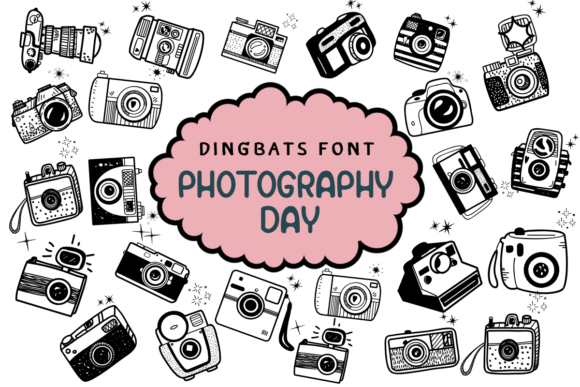
Capturing the perfect moment often requires more than just a camera; it requires the right aesthetic framing. In the world of graphic design, typography plays a massive role in setting the mood. While traditional serif and sans-serif fonts are the workhorses of layout, decorative fonts bring the personality. Today, we are taking a closer look at Photography Day, a unique dingbat font designed specifically for those who appreciate the art of the lens. Unlike standard typefaces that render letters and numbers, this font is a collection of vector graphics disguised as keystrokes, offering a sketch-style collection of photography equipment and symbols.
Understanding the Core Concept
First, it is important to clarify exactly what Photography Day represents. It is a dingbat font, meaning that when you install it and type a letter on your keyboard, an image appears instead of text. In this case, the imagery is heavily focused on the photography niche. You will find sketches of vintage cameras, modern DSLRs, tripods, flash units, lenses, and darkroom equipment. The defining characteristic of this collection is its "sketch style." It does not look like a sterile, corporate icon set. Instead, it mimics hand-drawn illustrations, giving it a warm, organic, and artistic feel.
This aesthetic is particularly valuable because it bridges the gap between technical equipment and artistic expression. The hand-drawn nature of Photography Day suggests creativity and a personal touch. It avoids the cold, rigid lines often associated with technology, making it an ideal choice for projects that need to feel inviting and authentic.
Why Style Matters in Visual Communication
Visual communication relies heavily on consistency and mood. When you are working on a project—whether it is a wedding invitation or a social media post—the visual elements need to speak the same language. If your text is elegant and flowing, but your icons are sharp and robotic, the disconnect can confuse the viewer.
Photography Day solves this problem for creative professionals working in the visual arts. Because the icons look hand-sketched, they pair exceptionally well with textured backgrounds, watercolor elements, and handwritten script fonts. This makes the font a powerful tool for designers who want to maintain a cohesive "human" element in their digital or print layouts. It adds a layer of depth that stock photography or standard digital icons simply cannot achieve.
Practical Applications for Creators and Professionals
The versatility of a dingbat font lies in its application. While Photography Day is clearly rooted in the photography industry, its utility extends far beyond just camera shops. Here is how various professionals can leverage this tool:
Event Stationery and Invitations
For wedding planners and stationery designers, Photography Day is a secret weapon. Imagine designing an "Engagement Shoot" announcement or a "Save the Date" card. Instead of searching for stock images of cameras, you can use this font to create seamless vector graphics that match the sketchy, romantic style of the invitation suite. It works beautifully for DIY brides and grooms who are designing their own materials using software like Canva, Photoshop, or InDesign.
Branding and Logo Design
Entrepreneurs in the photography space often struggle to find affordable, unique branding. A sketch-style font like Photography Day can serve as the foundation for a logo. By typing out a specific character, a photographer can isolate a vector camera icon, adjust its color, and integrate it with their name. This is particularly useful for freelance photographers who want a "handmade" vibe for their brand without paying for a custom illustration from scratch.
Digital Content and Social Media
Bloggers and social media managers need a constant stream of fresh visuals. Photography Day can be used to create custom bullet points for lists, section dividers for blog posts, or graphics for Instagram stories. Because the font renders as a vector shape, it can be resized infinitely without losing quality. This ensures that your graphics look crisp whether they are on a mobile phone screen or a desktop monitor.
Crafts and Physical Decorations
The utility of this font extends into the physical realm as well. Crafters using cutting machines (like Cricut or Silhouette) often need SVG-style files to cut shapes out of vinyl or cardstock. Since Photography Day characters are essentially vector shapes, they can be converted into cut files easily. This allows for the creation of custom stickers, cake toppers for a photography-themed birthday party, or iron-on transfers for tote bags.
Enhancing User Experience and Efficiency
From a workflow perspective, using a font like Photography Day offers significant efficiency gains. Searching for the right stock icon can be time-consuming. You have to navigate licensing agreements, download files, and ensure the style matches your other assets. By using a dedicated dingbat font, all your icons are accessible directly from your keyboard or character map within your design software.
This streamlines the design process. If you are building a brochure for a camera store or a lesson plan for a photography class, you can insert relevant imagery as quickly as you type a sentence. Furthermore, because the style is consistent across the entire font, you guarantee visual harmony throughout your document. You don't have to worry about one icon looking like flat design while another looks like a 3D render; Photography Day maintains a uniform sketch aesthetic.
Recommendations for Implementation
If you decide to integrate Photography Day into your toolkit, there are a few practical considerations to keep in mind to maximize its impact.
- Pairing Fonts: Because the dingbat style is sketchy and artistic, pair it with typography that complements this mood. A handwritten script font works well for headers, while a clean, readable serif or sans-serif font is best for body text. Avoid pairing it with overly geometric or futuristic fonts, as the clash in styles can be jarring.
- Color Usage: The sketch style often looks best when the "ink" isn't pure black. Try using a dark charcoal grey or a rich sepia tone to mimic the look of pencil or pen on paper. This subtle adjustment can make the graphics feel more integrated into the overall design.
- Size and Spacing: Since these are illustrative characters, they may require different spacing than text. You might need to adjust the kerning (space between characters) in your design software to ensure the icons sit comfortably next to your text or other design elements.
- Software Compatibility: Photography Day is a standard font file, making it compatible with virtually all design software, from Microsoft Word to Adobe Illustrator. However, for the best control over the vector shapes, professional design software is recommended.
The Value of Niche Design Assets
In a market saturated with generic design elements, specificity wins. Using a niche asset like Photography Day demonstrates attention to detail. It shows that you, as a creator or business owner, understand the visual language of your industry. Whether you are an educator teaching students about the history of the camera, a blogger reviewing the latest lenses, or a couple celebrating your love for snapshots, this font provides a tailored solution.
Ultimately, Photography Day is more than just a collection of pictures; it is a stylistic tool that helps bridge the gap between text and imagery. By adopting this sketch-style font, you can elevate your creative projects, streamline your design workflow, and ensure your visual content resonates with authenticity and charm.