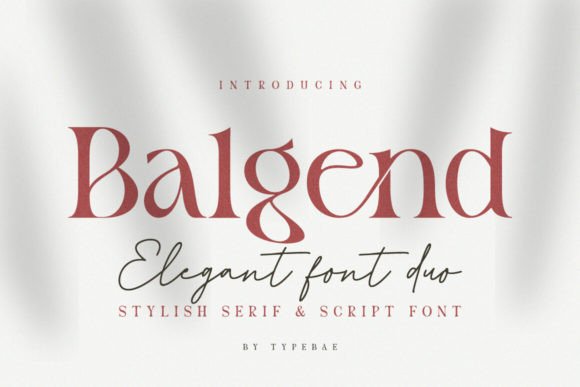
Mastering Balgend: A Guide to Using This Serif and Script Duo Effectively
Choosing the right typeface is often the defining moment in a design project. It sets the mood, dictates readability, and establishes the brand's voice. Balgend has emerged as a popular choice for creatives seeking a blend of tradition and flair. As a captivating font duo, it pairs a contemporary serif with an expressive script, offering a solution that feels both timeless and modern. However, the appeal of such a stylistic set can often lead to oversight regarding its technical application.
While Balgend is undeniably elegant, using a font duo requires a different approach than selecting a standard sans-serif. The combination of a structured serif and a fluid script creates a dynamic visual hierarchy, but only if used correctly. For designers, entrepreneurs, and creators, understanding the nuances of this typeface is crucial. It is not merely about downloading a file; it is about integrating a complex design tool into your workflow without compromising the final output.
Understanding the Anatomy of Balgend
Before diving into application, it is essential to understand what makes Balgend unique. The typeface is composed of two distinct styles that are designed to work in harmony. The serif component provides structure and readability, making it suitable for body text or subheadings. The script component, on the other hand, introduces personality and fluidity, ideal for logos, titles, or accent text.
A critical feature that users often overlook is its PUA (Private Use Areas) encoding. This technical specification is what allows users to access special glyphs and ligatures without professional design software. However, many beginners misunderstand what this actually means for their specific workflow. Just because a font has these features does not mean every application will support them equally.
The Trap of Overusing the Script Style
One of the most common mistakes with Balgend is the overuse of the script variation. The expressive nature of the script font is visually striking, which tempts users to apply it to large blocks of text. This is a decision that almost always hinders communication.
Script fonts, by nature, have varying stroke widths and intricate connections between letters. While this looks beautiful in a headline, it becomes a wall of visual noise when applied to a paragraph. The reader’s eye struggles to track lines of text, leading to fatigue and a loss of message clarity. For example, using the script font for a full "About Us" page can make a brand look amateurish rather than sophisticated.
The Better Approach: Use the Balgend script sparingly. It works best as an accent. Use it for a hero banner headline, a pull quote, or a logo mark. For body copy, switch to the serif companion. This contrast creates a professional hierarchy that guides the reader's eye naturally.
Ignoring Ligatures and Contextual Alternates
Because Balgend is PUA encoded, it comes packed with ligatures and stylistic alternates. These are custom letter combinations that smooth out the flow of text, particularly in script fonts. A common oversight is leaving these features turned off. When ligatures are disabled, script fonts can look disjointed. You might see an awkward collision between the tail of a "g" and the stem of an "l," or a harsh connection between a "t" and an "h."
This technical oversight ruins the "flawless marriage" of the font duo. It makes the text look like a rough draft rather than a polished design. Many users assume the font is poorly made, not realizing the issue lies in their software settings.
Practical Advice: Check your OpenType features. In software like Adobe Illustrator or Photoshop, ensure that "Standard Ligatures" and "Contextual Alternates" are enabled. If you are using a website builder, ensure your CSS supports OpenType features. If you are using Canva or similar platforms, check the text editing toolbar for a "Show Ligatures" or stylistic option. This small toggle can completely transform the elegance of Balgend.
Mismatching the Serif and Script Weights
A font duo implies balance, but that balance is not automatic. Balgend pairs a specific weight of serif with a specific weight of script. A frequent error occurs when users try to force these elements into incompatible layouts. For instance, a user might scale the script font very small to fit a tight space while keeping the serif font large.
This scaling creates a visual disconnect. The delicate strokes of a script font do not scale down well; they can become illegible or disappear entirely on small screens. Conversely, if the serif is too light and the script is too bold, the visual weight shifts incorrectly, making the design feel unstable.
How to Avoid This: Test your typography at the size it will be viewed. If you are designing for mobile, check the text on a phone. Ensure the contrast between the serif and the script is intentional. Generally, the script should be used for emphasis, meaning it can afford to be slightly larger or bolder than the serif body text, but never so much that it overwhelms the layout.
Technical Hurdles: Installation and Web Usage
The excitement of a new font purchase often leads to rushed installation. Balgend usually comes with multiple files for the serif, script, and italic versions. A common mistake is installing only one file or the wrong file type. For desktop use, you typically need the .OTF (OpenType Font) or .TTF (TrueType Font) files. For web use, you need .WOFF or .WOFF2 files.
Users often try to upload .OTF files to their website’s backend. This fails to render correctly for visitors because browsers handle fonts differently than operating systems do. The result is that your beautiful Balgend typography defaults to Times New Roman or Arial, completely destroying the design intent.
The Fix: When buying or downloading Balgend, check the license to ensure it includes a Web License. Upload the correct web font files to your server and use @font-face in your CSS. If you are using a platform like WordPress, use a plugin designed to handle font uploads to ensure the correct file paths are generated.
Evaluating Licensing and Project Scope
Before integrating Balgend into a major branding project, verify the license. Fonts are software, and their usage rights vary. A "Desktop" license usually covers creating images (logos, PDFs, social media posts). A "Web" license covers embedding the font in a website's code.
A critical mistake is assuming a desktop license covers everything. If you create a logo for a client using Balgend, that is usually fine under a standard license. However, if you embed the font on a high-traffic website without a web license, you could face legal issues or technical blocking by font foundries.
Best Practice: Read the End User License Agreement (EULA). If you are a freelancer creating assets for a client, ensure the client also has the appropriate license if they intend to use the files independently. This protects both you and your client from unexpected costs or legal friction down the road.
Final Thoughts on Using Balgend
Balgend is a powerful tool for adding a touch of timeless elegance to your designs. Its combination of contemporary serif and expressive script offers immense versatility. However, versatility requires discipline. By avoiding the overuse of the script style, enabling ligatures, checking weight balance, and verifying technical file types, you ensure that the font enhances your work rather than complicating it.
Treat Balgend