Quietly: Elevating Design with Elegant Sans Serif Typography
In the crowded landscape of digital design, the choice of typeface often serves as the silent narrator of your brand’s story. While bold and loud fonts scream for attention, there is a sophisticated power in subtlety. Quietly is a modern sans serif font designed specifically to capture this elegance. It bridges the gap between contemporary minimalism and functional legibility, making it a versatile tool for creatives ranging from magazine editors to packaging designers. However, even the most elegant tool can be misused. To truly unlock the potential of Quietly, one must move beyond simply installing the file and start understanding the nuances of its application.
The Essence of the Quietly Typeface
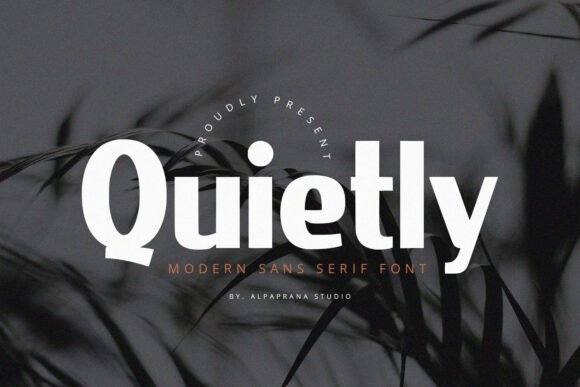
At its core, Quietly is characterized by clean lines, balanced spacing, and a modern aesthetic that feels premium without being pretentious. Unlike heavy geometric sans serifs that can feel industrial, or ultra-thin fonts that struggle on screen, Quietly strikes a harmonious balance. This makes it perfectly suited for high-end applications such as photography watermarks, special event invitations, and book covers where the typography must complement the visual rather than overpower it.
For entrepreneurs and small business owners, Quietly offers a way to instantly modernize a visual identity. Imagine a boutique shopping bag or a minimalist t-shirt design; the font communicates quality and attention to detail. However, the interest in this font often stems from its visual appeal in a preview, leading many to overlook critical technical and aesthetic considerations before implementation.
Common Pitfalls in Selecting and Using Quietly
One of the most frequent mistakes made by beginners and even seasoned designers is prioritizing style over context. A font might look beautiful in a large display size on a high-resolution monitor, but fail miserably when applied to a different medium.
The "Thumbnail Trap" and Low-Resolution Issues
Many users select Quietly because it looks stunning in a portfolio mockup or a digital preview. However, a common misunderstanding involves the transition from digital to print. If you are using Quietly for packaging or posters, you must consider the print resolution and the material texture. A common error is applying a modern sans serif like Quietly onto textured, recycled paper without accounting for ink bleed. While the font is designed for elegance, thin strokes can disappear on rough surfaces, rendering your message illegible.
The Fix: Always conduct a test print. If the substrate is rough, consider using the Bold or Black weights of the Quietly family rather than the Light or Regular variants. This preserves the modern feel while ensuring the text remains readable, maintaining the usability and quality of your design project.
Overlooking Kerning and Tracking in Headlines
Quietly is a modern font, which often implies it is designed with generous spacing (tracking) to breathe. However, when used for massive headlines on posters or book covers, default spacing can sometimes look too loose or "airy," causing the words to fall apart visually. Conversely, cramming it into a tight logo lockup without adjusting the kerning (the space between specific pairs of letters) can make the text look amateurish.
The Fix: Do not rely solely on the font’s default metrics for display sizes. If you are designing a logo or a headline for a magazine spread, manually adjust the tracking. For Quietly, tightening the tracking slightly by -10 to -20 units often creates a more cohesive, high-end look that enhances the presentation and communication of the brand.
Application-Specific Errors and Better Approaches
The versatility of Quietly means it is used across various mediums, but this versatility can lead to a "one-size-fits-all" mentality which is detrimental to professional results.
Digital vs. Print: Resolution and Rendering
A significant oversight occurs when designers use Quietly for web design without checking font hinting or rendering across different browsers. While the font is elegant, some modern sans serifs can appear jagged on Windows systems if not properly hinted, whereas they look smooth on macOS.
The Fix: Before finalizing a website design or a digital presentation using Quietly, test it on multiple devices. Use CSS properties like -webkit-font-smoothing: antialiased to help render the font more crisply on screens. This ensures that the elegance seen in your design software translates to the user's browser, preserving the efficiency and quality of the user experience.
Pairing Mistakes: The Clash of Personalities
Choosing a companion font for Quietly is where many projects stumble. Because Quietly has a distinct "modern sans serif" personality, pairing it with another sans serif that is too similar (like Helvetica or Arial) creates a visual discord where the fonts look like they are trying to be the same but failing. Conversely, pairing it with an overly decorative script font can make the design look disjointed.
The Fix: Embrace contrast. Quietly pairs beautifully with classic Serifs (like Garamond or Playfair Display) for a timeless, editorial look suitable for book covers or magazines. If you prefer a modern stack, pair it with a monospaced font for a tech-forward, minimalist aesthetic. This approach ensures your typography hierarchy is clear and the design feels intentional.
Technical Evaluation: Licensing and File Formats
For freelancers and small business owners, the decision to download or buy a font like Quietly often comes down to the price tag. However, a critical mistake is ignoring the licensing details or the file format provided.
Understanding Licensing Scope
You might find a "free" version of Quietly or a discounted bundle. However, using a font licensed only for "Desktop" use on your company’s high-traffic website (which requires a "Web" license) is a copyright infringement that can lead to costly legal issues. Similarly, if you are a freelancer creating a logo for a client using Quietly, you must ensure the license allows for commercial use and that the client receives the appropriate rights.
The Fix: Before making a decision, read the End User License Agreement (EULA). If you are an agency or a business, investing in a comprehensive license for Quietly is safer than risking compliance issues. Check if the provider offers a "Webfont" kit (usually in .WOFF or .WOFF2 formats) for digital projects and .OTF/.TTF for print and software use.
Variable Fonts and Software Compatibility
Modern fonts are increasingly moving toward variable formats. If Quietly is provided as a Variable Font, it allows for infinite adjustments of weight and width in a single file. However, a common frustration arises when users try to open these files in older versions of design software (like legacy Adobe Illustrator or older CMS platforms) that do not support variable font technology. The font may appear broken or fail to load entirely.
The Fix: Check your software version before downloading the variable version of Quietly. If you are working with older systems, opt for the static versions (.OTF) which provide fixed weights (e.g., Light, Regular, Bold). This prevents technical bottlenecks and ensures your workflow remains efficient.
Practical Advice for Evaluating Quietly
Before you commit to Quietly for your next major project, such as a rebrand or a product launch, take a moment to evaluate it against your specific needs. Do not just type out the font name; type out the actual headlines and body copy you intend to use.
Look at the numerals and punctuation. Does the font include the specific currency symbols you need? Do the quotation marks look smart and curly (typographic quotes) or straight and generic? For a font aiming for elegance, these details matter immensely in high-end packaging and editorial design.
Furthermore, consider the longevity of the trend. While Quietly is a modern sans serif, ensure that its specific stylistic quirks—such as a unique 'a' or 'g' shape—align with your brand’s long-term vision. A font that is too trendy might feel dated in three years. Quietly leans towards a classic modernism, which is a good sign for longevity, but always view the full character set to ensure it matches your brand voice.
Conclusion
Quietly represents the best of modern sans serif design: it is versatile, elegant, and functional. It offers a solution for designers who want to convey sophistication without shouting. However, the success of your design relies not just on the font itself, but on how you manage the technical and aesthetic details surrounding it. By avoiding common pitfalls regarding print legibility, kerning, licensing, and font pairing, you can ensure that Quietly works effectively for your magazines, posters, and branding projects. Take the time to test, adjust, and understand the font, and it will reward you with a professional, polished result that speaks volumes in its silence.